Evaluating the Kids School Education Flyer Template for Professional Use
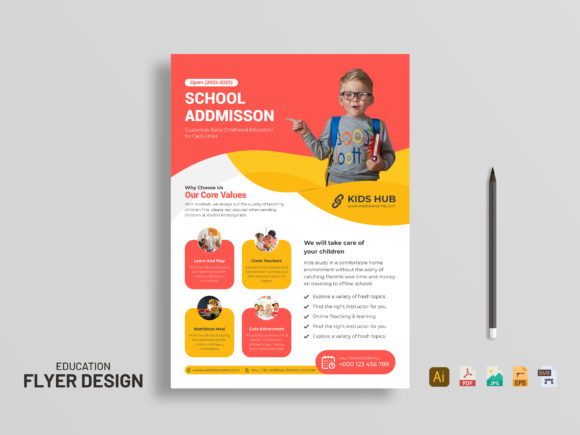
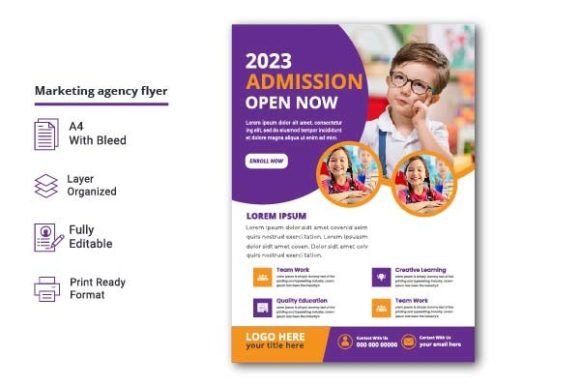
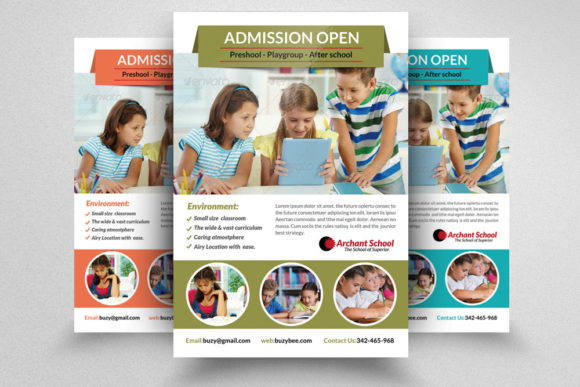
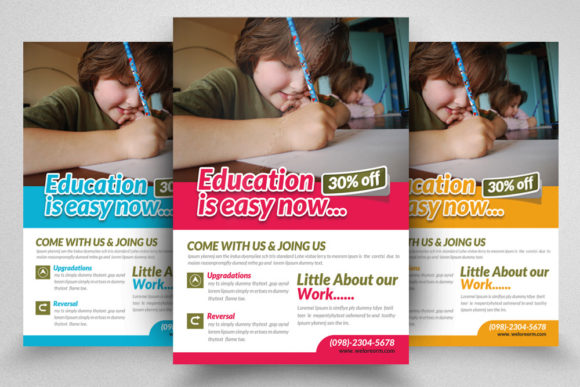
In the competitive landscape of educational marketing, visual communication serves as the first point of contact between an institution and potential families. Whether you are a private tutor, a daycare owner, or a marketing director for a larger school district, the quality of your printed materials reflects directly on your brand’s perceived professionalism. This is where a well-structured design asset becomes indispensable. The Kids School Education Flyer template offers a streamlined solution for creating high-impact promotional materials without requiring extensive graphic design expertise. By leveraging pre-built structures, educators and marketers can focus on messaging rather than layout mechanics.
This analysis explores the technical specifications, usability features, and practical applications of this design resource. It aims to help professionals determine if this template aligns with their workflow, printing requirements, and branding goals.
Technical Specifications and Print Readiness
One of the most critical aspects of any print-ready design is its technical foundation. A visually appealing file is useless if it fails to produce a sharp, professional result when sent to a commercial printer. The Kids School Education Flyer is engineered with industry-standard specifications that ensure consistency across various printing environments.
The file is set up in CMYK color mode, which is essential for offset and digital printing. Unlike RGB, which is designed for screens, CMYK ensures that the colors you see on your monitor closely match the final ink output. This prevents the common issue of vibrant screen colors appearing dull or shifted in print. Furthermore, the resolution is set at 300 DPI (dots per inch). This high resolution is non-negotiable for professional printing, as it guarantees crisp text and clear images, avoiding the pixelation that occurs with lower-resolution web graphics.
The dimensions are standardized at 8.5×11 inches, the typical letter size used in North America. This makes it compatible with standard office printers for small batches or easy to handle for large-scale commercial runs. Additionally, the inclusion of a 0.25-inch bleed is a vital feature. Bleed allows background colors and images to extend beyond the trim edge, ensuring that no white borders appear if the cutting process shifts slightly. For professionals who have experienced the frustration of misaligned cuts, this attention to detail saves time and reduces waste.
Customization and Workflow Efficiency
Time is a scarce resource for educators and small business owners. The primary value proposition of the Kids School Education Flyer lies in its ease of customization. The file is delivered as a PSD (Photoshop Document), which is widely supported and familiar to many creative professionals. However, you do not need to be an expert in Adobe Photoshop to utilize this template effectively.
The layers are well-organized and clearly labeled. This logical structure allows users to navigate the file quickly, locating specific elements such as headlines, body text, or background graphics without sifting through hundreds of unnamed layers. The text layers are fully editable, meaning you can change fonts, sizes, colors, and content to match your specific event or program details. This flexibility ensures that the template can serve multiple purposes, from advertising summer camps to announcing open house events.
A standout feature is the use of Smart Object layers for image placement. Instead of manually resizing and masking photos, users can simply double-click the Smart Object, paste their own image, save, and watch it automatically fit into the designated frame with the correct perspective and lighting adjustments. This significantly reduces the learning curve and ensures a polished look even for beginners. Moreover, the template utilizes free fonts. This eliminates the need for expensive font licenses or the risk of font substitution errors when sharing files among team members. You can download the required fonts at no cost, ensuring the design remains intact across different systems.
Practical Applications and Target Audience
Who benefits most from this type of resource? The Kids School Education Flyer is versatile enough to serve a broad spectrum of users within the education and childcare sectors. Private tutors can use it to advertise their services in local community centers. Daycare providers can distribute it to prospective parents during tours. Larger schools might use it for internal communications or special event promotions.
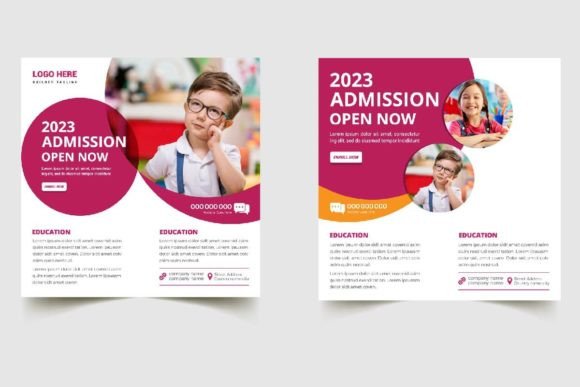
Beyond traditional education, the template is suitable for entrepreneurs launching kids’ activity clubs, art workshops, or sports leagues. The clean and professional aesthetic appeals to parents who prioritize safety, quality, and organization. By using a high-quality template, these professionals signal that they take their service seriously. It bridges the gap between amateur homemade flyers and expensive agency-designed campaigns.
For freelancers and designers who manage multiple clients, this template acts as a time-saving base. Instead of starting from scratch for every education-related client, you can adapt this layout, change the color scheme to match the client’s branding, and deliver a premium product faster. This efficiency can improve profit margins and allow for more client acquisitions.
Quality, Consistency, and Long-Term Value
Consistency in branding builds trust. When all your promotional materials share a cohesive look and feel, it reinforces brand recognition. The Kids School Education Flyer provides a solid foundation for this consistency. Its clean lines and balanced composition ensure that the information is readable and engaging. Cluttered designs often overwhelm readers, leading to lower conversion rates. This template avoids that pitfall by prioritizing whitespace and hierarchy.
The long-term value of purchasing a template like this extends beyond a single use. Once you understand the layer structure, you can reuse the file for future events, simply updating the text and images. Over time, the cost per use decreases, making it a highly economical investment compared to hiring a designer for each individual project. The included Instruction.txt help file further enhances this value by guiding users through any potential setup issues, ensuring a smooth experience from download to print.
It is important to note that images are not included in the download. This is standard practice for stock templates to avoid licensing complications. Users must source their own high-quality photography. While this requires an extra step, it also offers complete creative control. You can choose images that genuinely represent your facility and staff, which adds authenticity to your marketing efforts.
Limitations and Considerations
While the template offers significant advantages, it is not without limitations. It requires Adobe Photoshop or a compatible editor that supports PSD files and Smart Objects. Users relying solely on Canva or Microsoft Word will not be able to edit the native file directly, although they could export flattened images for reference. Additionally, while the design is professional, it is still a template. To stand out, users should invest effort in customizing colors and selecting unique imagery that differentiates them from others who may use the same base design.
Another consideration is the print process. Even with a 300 DPI file and proper bleed settings, the final output depends on the printer’s quality. Users should always request a proof before committing to a large print run. Testing the colors on paper is crucial, as screen calibration varies widely.
Final Thoughts on Usability
The Kids School Education Flyer represents a practical tool for anyone needing to communicate educational offerings effectively. Its combination of technical precision, user-friendly customization, and professional aesthetics makes it a valuable asset in a marketer’s toolkit. By removing the technical barriers of design, it allows educators and business owners to focus on what matters most: connecting with their audience.
If you are looking to elevate your promotional materials without the overhead of custom design fees, this template offers a balanced solution. It respects the constraints of print production while providing the flexibility needed for modern branding. After using the item, consider rating it to help other professionals make informed decisions. Your feedback contributes to the community of creators and helps maintain high standards for digital resources.